Your ladder is an instruction
You choose every waiting period and every depth. AI never replaces the percentages you set, and nothing is imposed on you.
Sparande E-commerce · A focused app powered by SparGrid
Stock that sits too long costs you twice: the cash tied up in it, and the space it takes from something that would sell. Markdown Optimizer lets you set a markdown ladder once, such as 5% off after 60 days listed, 10% after 90, 15% after 120 and 25% after 150, and then applies it to every product on its own clock.
AI finds the possibilities. Our maths verifies what is safe to launch. Every step, whether it comes from your ladder or from an AI proposal, is priced and checked against your margin floor before it can touch your store. The floor is your cost per item, or cost plus a percentage you choose, and no step sells below it.

A little over a minute, with real screens from the app. You set the ladder, and AI only finds possibilities across your catalogue. Whether a markdown is safe is always decided by deterministic, quantitative mathematics, tested against your margin floor: cost, or cost plus a percentage you choose. AI never sets a price, and a step that would sell below your margin floor never reaches your store.
Markdowns are where AI can do the most good and the most harm. It can see patterns across a whole catalogue that nobody has time to find, and it can also discount a product into a loss without noticing. So we split the work: AI proposes, and mathematics decides whether the proposal is safe.
You choose every waiting period and every depth. AI never replaces the percentages you set, and nothing is imposed on you.
AI reads your catalogue, your sales evidence and your own notes. It can propose an improved schedule, or a safe alternative when one of your steps would fail its checks.
Every schedule is priced from the original price and tested against your margin floor: cost, or cost plus a percentage you choose. Anything unsafe is held, with the reason.
Before any markdown can be scheduled, the maths returns one of three verdicts. It reports every reason it finds, not only the worst, so you always know what stopped a step.
| Verdict | What it means | What happens next |
|---|---|---|
| Valid | Every step stays at or above your margin floor: cost, or cost plus a percentage you choose. | The step is scheduled and applied when the product reaches it. |
| Revise | A step would fall below your margin floor or break a rule, but a safe depth exists. | AI proposes an alternative inside the limits the maths has set, and the maths checks it again. |
| Hold | No safe version exists, or the evidence is missing, for example a product whose listing date cannot be read. | Nothing changes in your store, and you are told exactly why. |
A ladder is a staircase of prices. A product starts at full price and, the longer it stays listed, the further it steps down. The example below is a ladder as a user would set it up in Markdown Optimizer, with any values they want, in days or months. For example, 5% off after 60 days, 10% after 3 months, 15% after 120 days and 25% after 150 days. Each percentage is taken off the original price, not off the step before, so 25% means 25% in total.
A ladder is a calendar rule: after this many days listed, take this much off. You do not pick products by hand or maintain a list.
A step fires once a product has been listed for the waiting period. A product listed today and one listed last winter sit on different steps of the same ladder.
When a step comes due, the platform decides which products qualify and what the reduction would cost you. If it cannot produce a figure, you are told, rather than shown a zero.
A struck-through original price is shown only where the product's recorded price history proves it; otherwise the price is simply lowered. You can turn the original-price display off in Settings, under Markdown rules.
Mark any step to wait for your approval. Everything else runs on its own, and you see what is coming before it happens.
Each recommendation comes with a short explanation that follows your own notes as house rules. The explanation can never change a price or a figure.
Trust in automation comes from knowing its limits. These are written into the app.
Every product has a place on the ladder and a reason for being there. The same price that clears the maths in the app is the price that appears in your store.
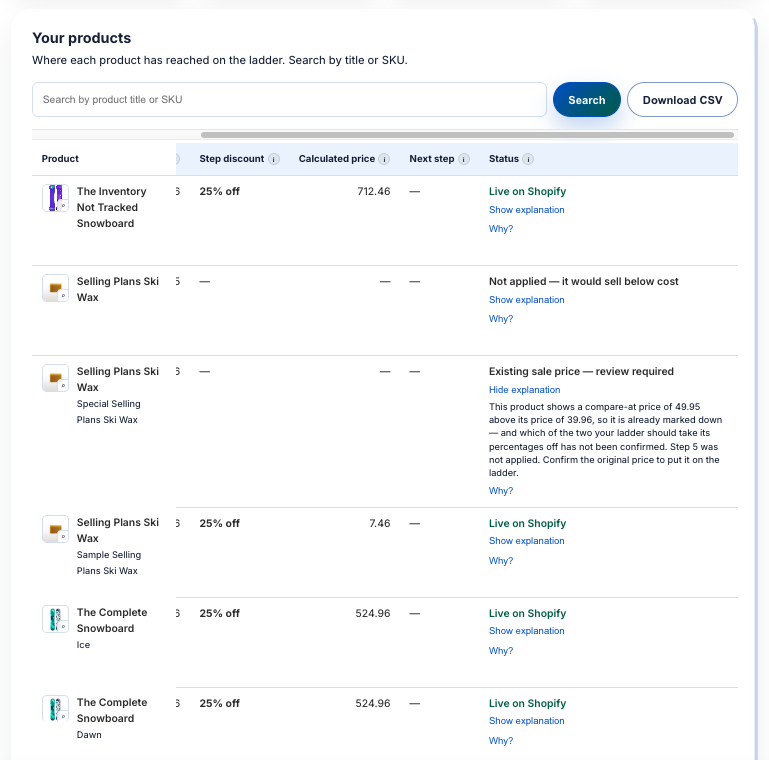
The products view shows the step each product has reached, the discount at that step, the price the maths calculated and the step that comes next. Search by title or SKU, or download the whole list as a CSV.
The status column is where the three verdicts become visible. Most rows here are live on Shopify at 25% off. One was not applied because it would sell below cost. Another already carried a sale price, so the app stopped and asked which price is the original before taking anything off it.
Every row has an explanation in plain words and a “Why?” link, so a held markdown is never a mystery.
This is the same snowboard from the products view. The app calculated 524.96 at the 25% step, and that is exactly what the product page shows.
The markdown is applied to the product’s own price, so shoppers see it on the product page before they reach the cart.

Markdown Optimizer is a focused app that runs on the SparGrid platform. It puts the markdown engine to work on one job: moving ageing stock at a depth the numbers can defend. SparGrid itself runs ten business agents and sixty capabilities across every channel, so when you need more than markdowns, you can adopt the full platform without changing tools.
Set your ladder once. Markdown Optimizer applies it to every product at the right age, checks every step before it reaches your store, and tells you why in plain words.
Legal: Privacy Policy · Terms of Service